
Microsoft Fabric as an All-in-One Analytics Solution
A deep dive into Microsoft Fabric — OneLake, Workspaces, Lakehouse, Warehouse, Apache Spark, and how it compares to Data Mesh and decentralised approaches.

Radek Řezáč
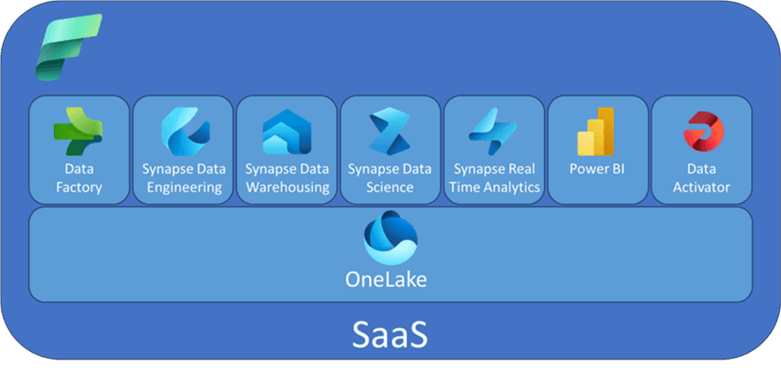
The data architecture landscape has oscillated repeatedly between centralised and decentralised governance models. Microsoft Fabric represents a strong push back toward centralisation — bringing together data movement, data engineering, data science, real-time analytics, and business intelligence into a single unified platform (SaaS). No separate services, no data movement between tools.
Centralised vs. Decentralised Data Management
Centralised Data Management — data from different sources gathered and stored in one central database, warehouse, or data lake. A single repository for managing, storing, and using data. Easier governance, simpler access control.
Decentralised Data Management — no central repository. Data distributed across different nodes or domains. Teams have direct access without third parties. More agile for autonomous teams, harder to govern at scale.
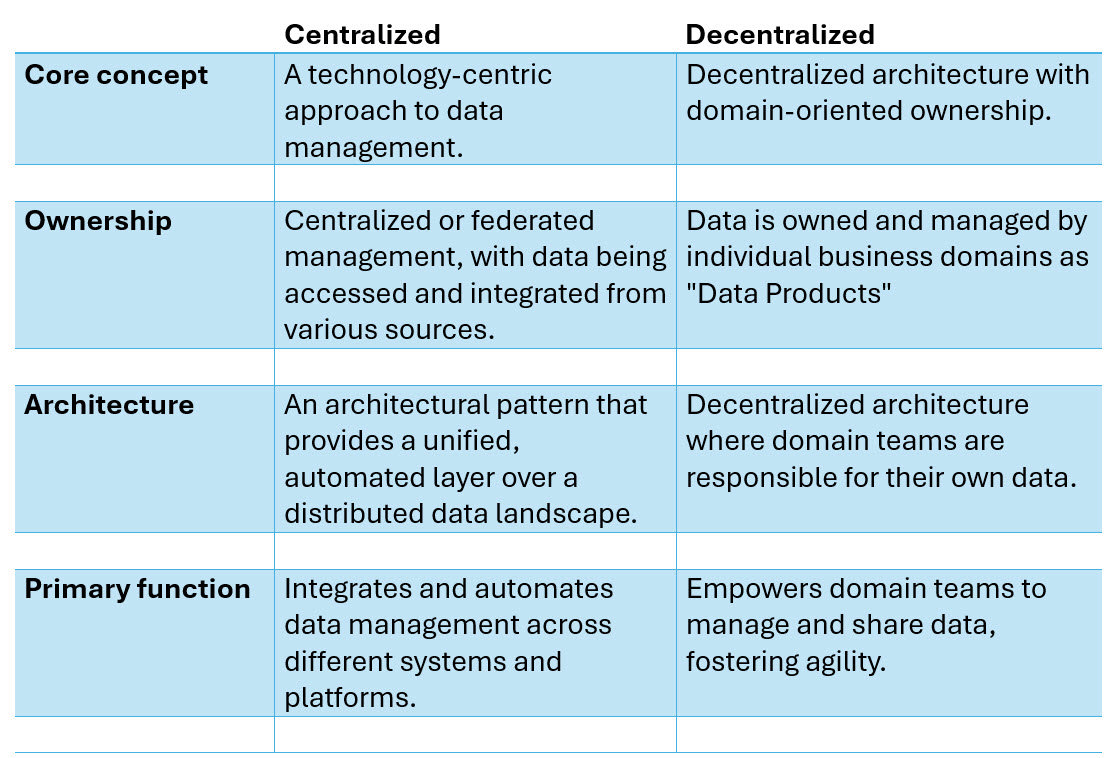
Data Mesh vs. Data Fabric
Data Mesh — a decentralised approach to data architecture that promotes domain-oriented ownership. Each domain team is responsible for its own data pipelines, governance, and quality. Data is treated as a product with defined contracts.
Data Fabric — a centralised approach to data architecture and management. An end-to-end, unified analytics platform that brings together all the data and analytics tools an organisation needs.

Microsoft Fabric
Microsoft Fabric is Azure's implementation of the Data Fabric approach. It integrates Azure Data Factory, Azure Synapse Analytics, Power BI, and OpenAI Service into a single unified product. Everything — data lake, data engineering, data integration, Power BI, real-time analytics — operates in one environment. It is fully managed (SaaS): no infrastructure provisioning, no service stitching, no data movement between vendors.
Microsoft Fabric Fundamentals
OneLake
OneLake serves as the central data repository — a managed data lake underpinning all of Fabric.
- Unified Storage — a single, unified storage system for all data assets. No need to piece together separate storage services.
- Data Accessibility — rather than physically moving data from AWS or Azure, OneLake allows you to create shortcuts to external files. Access data without complex pipelines.
- Integration — seamlessly integrates with all Fabric components.
- Governance and Security — built-in features for data governance and access control.
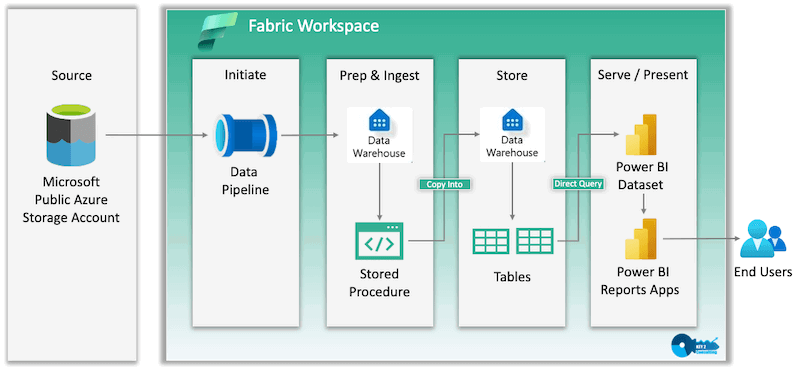
Workspace
A workspace is a dedicated environment for managing and organising data projects.
- Segmentation — a folder or segment designated for a specific project or department.
- Collaboration — team members are added with specific roles: admin, member, contributor, or viewer.
- Item Creation — create datasets, reports, data pipelines, notebooks, dashboards, and more.
- Capacity Assignment — workspaces must be assigned to a Fabric capacity to access platform features.
Lakehouse
A Lakehouse combines the functionality of a data lake and a data warehouse.
- Hybrid Storage — stores structured data (tables), semi-structured, and unstructured data (CSV, JSON). Suitable for analytics workloads and machine learning.
- Delta Tables — optimised for high performance, supporting both batch and real-time data processing.
- Centralised Location — a single location for storing, managing, and analysing files and data.
- Integration — works with Apache Spark, Delta Lake, and open-source tooling.
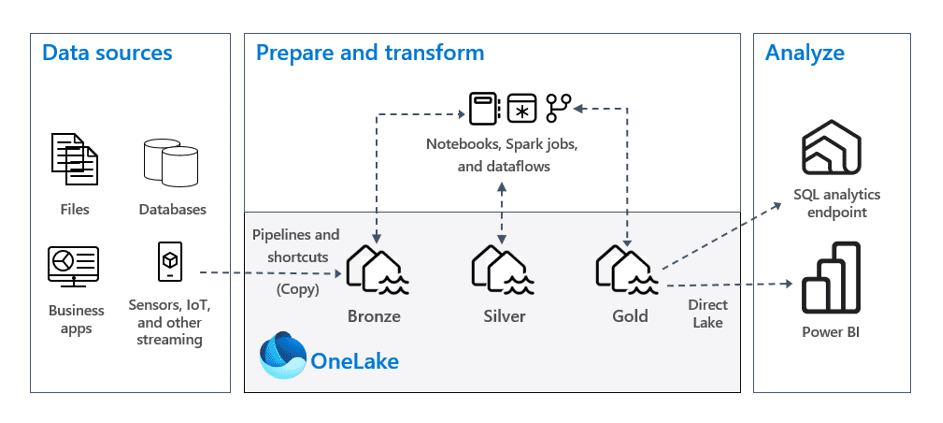
SQL Analytics Endpoint
The SQL Analytics Endpoint provides a connection interface for interacting with Lakehouse data using SQL.
- Provides a connection string usable in SSMS, Power BI, and other tools
- Includes a visual query builder for users less comfortable with SQL
- Enables SQL queries against Delta tables without writing Spark code
- Read-only via SQL — write operations require Spark or Fabric Pipelines
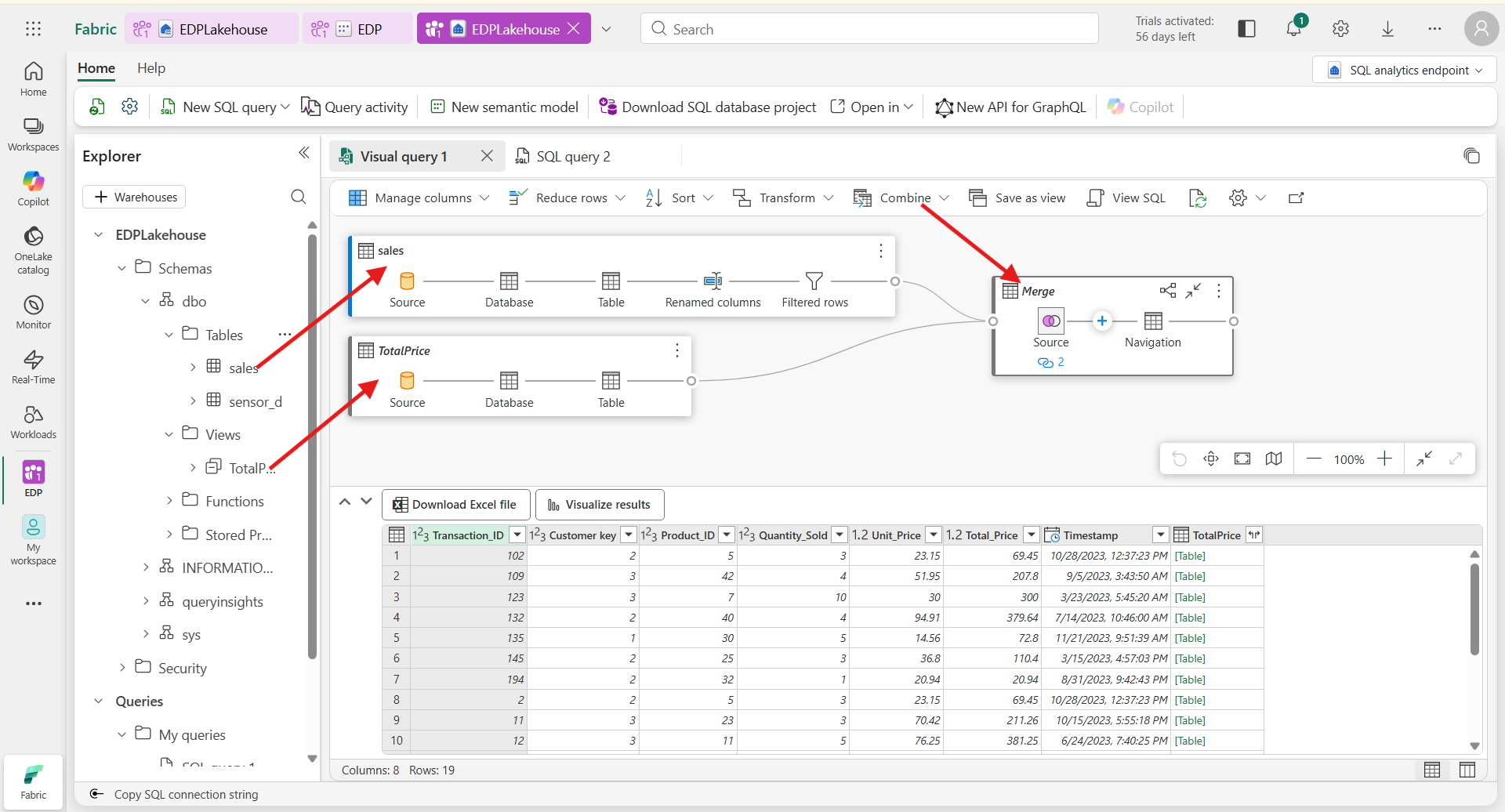
Shortcuts
A shortcut references a data table without creating a redundant copy. It acts as a link, allowing you to interact with data from external sources (SQL databases, ADLS, S3) as if it were native Lakehouse data — without ingesting it. Any modifications to the original table are reflected through the shortcut automatically.
Warehouse
The Warehouse is a specialised layer for high-performance analytics on structured data, utilising T-SQL.
Lakehouse vs. Warehouse:
| Lakehouse | Warehouse | |
|---|---|---|
| Data Types | Structured, semi-structured, unstructured | Structured (relational) only |
| Write via SQL | Read-only | Read and write |
| Best for | ML, diverse formats, batch + streaming | High-performance SQL analytics, BI |
| Underlying format | Delta Parquet | Delta Parquet |
Both are built on Delta tables in Parquet format, stored in OneLake. The Warehouse additionally supports T-SQL DDL (CREATE TABLE, INSERT, UPDATE, DELETE).

Power BI Semantic Model
The semantic model (formerly called datasets) is a data structure that organises data and defines relationships between tables, serving as the foundation for Power BI reports.
- Relationships — maintains table relationships for accurate analysis
- Measures — computed on-the-fly when the report runs; not stored physically
- Performance — reports reference the centralised Lakehouse data directly, avoiding redundancy
Semantic Model vs. Tabular Model:
| Power BI Semantic Model | Tabular Model (SSAS) | |
|---|---|---|
| Data storage | Referenced from Lakehouse — no duplication | Can be imported (in-memory) or DirectQuery |
| Usage context | Power BI Service reporting | Advanced modelling, SSAS, on-premises |
| Write environment | Power BI Service / Fabric | Power BI Desktop / SSAS |
Row-Level Security (RLS)
RLS in the semantic model restricts data access for specific users based on roles:
- Roles — defined with DAX filters that determine what data is visible
- Dynamic filtering —
USERNAME()orUSERPRINCIPALNAME()automatically filter data based on login credentials - Assignment — users are assigned to roles in Power BI Service after publishing
Apache Spark in Fabric
Apache Spark provides the distributed compute layer for Fabric's data engineering and data science workloads.
Strengths:
- Distributed Computing — operations execute in parallel across a cluster
- In-Memory Processing — data cached in memory, not disk — significantly faster than traditional approaches
- Resilient Distributed Datasets (RDDs) — fault-tolerant data partitions distributed across the cluster
- Multi-Language Support — Scala, Python, Java, SQL
- Batch and Streaming — handles both workload types natively
- ML Integration — MLlib and integration with MLflow for machine learning
Loading Data from a Lakehouse
df = spark.read.format("csv") \
    .option("header", "true") \
    .option("inferSchema", "true") \
    .load("lakehouse_path")

df.show()
Writing a DataFrame Back to a Lakehouse
As a Delta table (recommended):
df.write.format("delta").saveAsTable("tablename")
As a CSV file:
df.write.csv("lakehouse_path")
Verify the write:
new_df = spark.read.format("delta").load("lakehouse_path")
Temporary Views
Temporary views allow you to query DataFrames using SQL within the same Spark session:
# Create a temporary view
sales.createOrReplaceTempView("sales_temp_view")

# Query it with SQL
result = spark.sql("SELECT * FROM sales_temp_view")
result.show()
Temporary views are session-scoped — they disappear when the notebook session ends. Use them for ad-hoc analysis and joining multiple DataFrames with SQL syntax.
Summary
Microsoft Fabric is a significant bet on centralised analytics. For organisations running fragmented stacks — separate ADF, Synapse, Power BI, and Databricks environments — Fabric offers a compelling simplification. The trade-off is lock-in to Microsoft's ecosystem. For teams already deeply invested in Azure, that trade-off is often favourable.
General Delta Table Processing
A Python OOP approach for creating and updating Databricks Delta Tables — building a reusable, metadata-driven processing class based on the four pillars of object-oriented programming.
Orchard Core Shapes: Demystifying the View Data Model
How Orchard Core Shapes work as a dynamic view data model — creating, rendering, and extending shapes with data, metadata, Liquid templates, and strongly typed models.