
Data Platform Solution Architect: Roles, Responsibilities and Design Steps
What a data platform solutions architect does and how to design a data platform step by step: roles, responsibilities, pipeline foundations, architecture patterns, 23 design steps in six phases, a validation checklist and common pitfalls.

Radek Řezáč
A data platform succeeds or fails long before the first pipeline runs. It depends on whether someone turned the business vision into clear requirements, picked the right architecture pattern, and designed security, reliability, cost and operations from the start. This article describes the role of the data platform solutions architect and a step-by-step path from initiation to operation. It is a condensed guide based on one source, the Solutions Architect's Handbook (Shrivastava and Srivastav, 3rd edition, Packt, 2024); the diagrams come from the book.
What Solution Architecture Is
Solution architecture means "defining and envisioning various aspects of a business solution", with a strategic side (a long-term vision that adapts to change) and a tactical side (a design that handles today's workload). It goes beyond software: infrastructure, networking, security, compliance, operations, cost and reliability are all in scope, together with the data requirements and the non-functional requirements (NFRs).
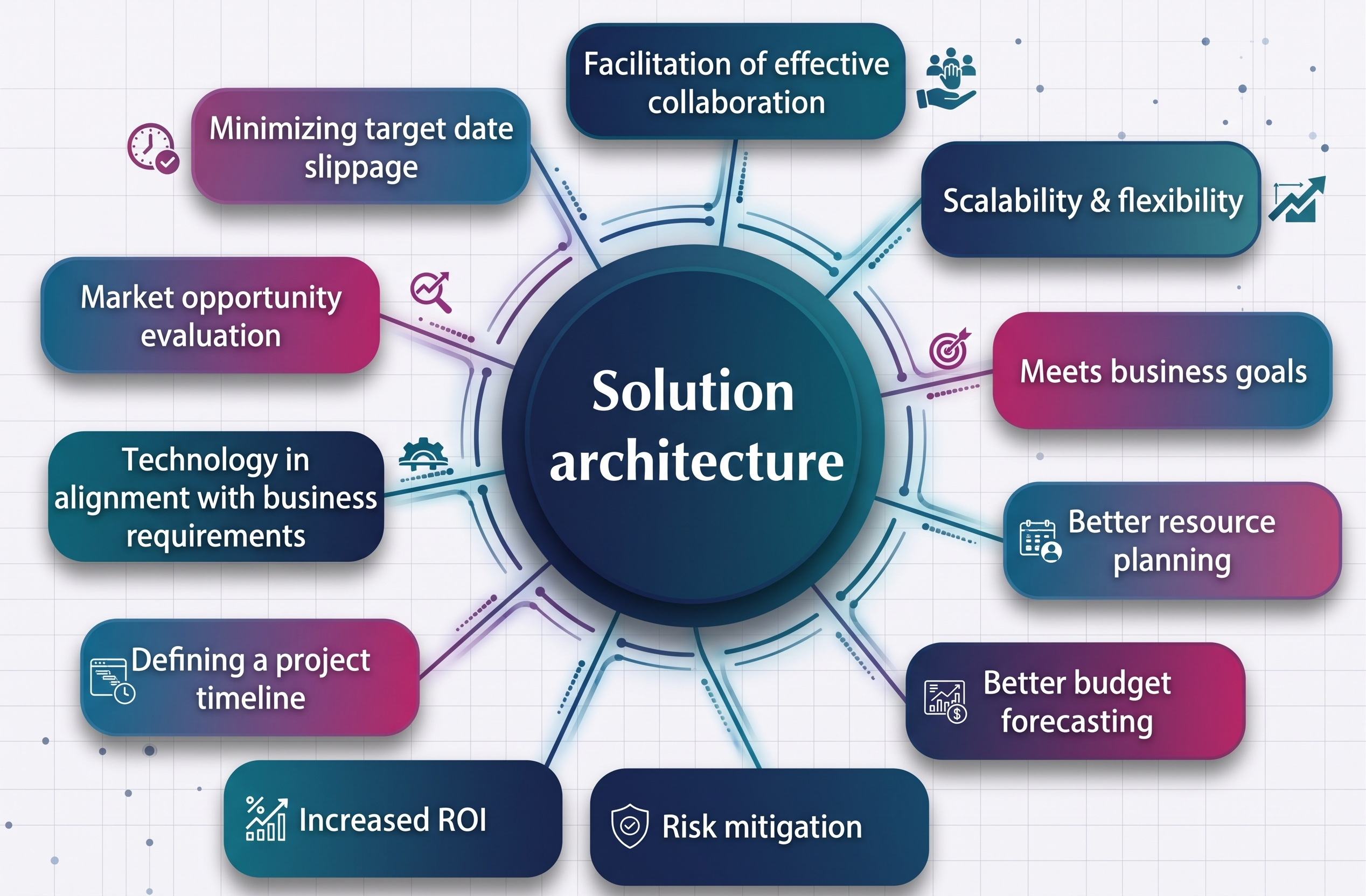
For a data platform one sentence from the book matters most: "Any software solution revolves around the collection and management of data", and "data heavily influences solution design".
Roles
Generalist solutions architects have broad knowledge and give holistic guidance. Specialist solutions architects have deep expertise in one area, such as big data, security, networking, an industry, or a platform like Databricks, Snowflake, AWS, Azure or GCP. A generalist works with specialists so the overall architecture stays cohesive.
| Role | Focus | Relevance to a data platform |
|---|---|---|
| Enterprise architect | Organisation-wide standards and technology choices | Sets enterprise data standards and guardrails |
| Application architect | Software and API design, integration | Owns source-system APIs and integration |
| Cloud architect | Cloud strategy, migration, cloud-native design | Hosting, migration and managed-service choices |
| Infrastructure / network architect | Capacity, DR, connectivity | Compute, storage, DR and on-premises connectivity |
| Data architect | Data strategy, standards, models, storage, processing, lakes, warehouses | The core role |
| ML / GenAI architect | Data for training and inference, AI systems | Consumers and extensions of the platform |
| Security architect | Risk, audit, compliance, encryption | Data protection and compliance controls |
| DevOps architect | CI/CD, IaC, monitoring, RPO/RTO | Automation and operations of pipelines |
The Data Architect
Also called an analytics or big data architect (unlike a database architect, whose scope is limited to relational databases). The mandate is to "define rules, policies, standards, and models that govern the type of data collected and used" and to "design, create, and manage the data architecture, ensuring consistent performance and quality". In practice this means:
- choosing database technology and storage for structured and unstructured data
- managing batch and streaming processing
- designing data lakes as central stores, warehouses and datamarts
- ensuring data security, compliance and encryption
- working closely with ML architects so data supports training and inference
Stakeholders range from executives using BI tools to data scientists building models.
Responsibilities
The architect "is involved in all the phases of solution design and delivery", and the cycle is iterative: production feedback drives the next round.
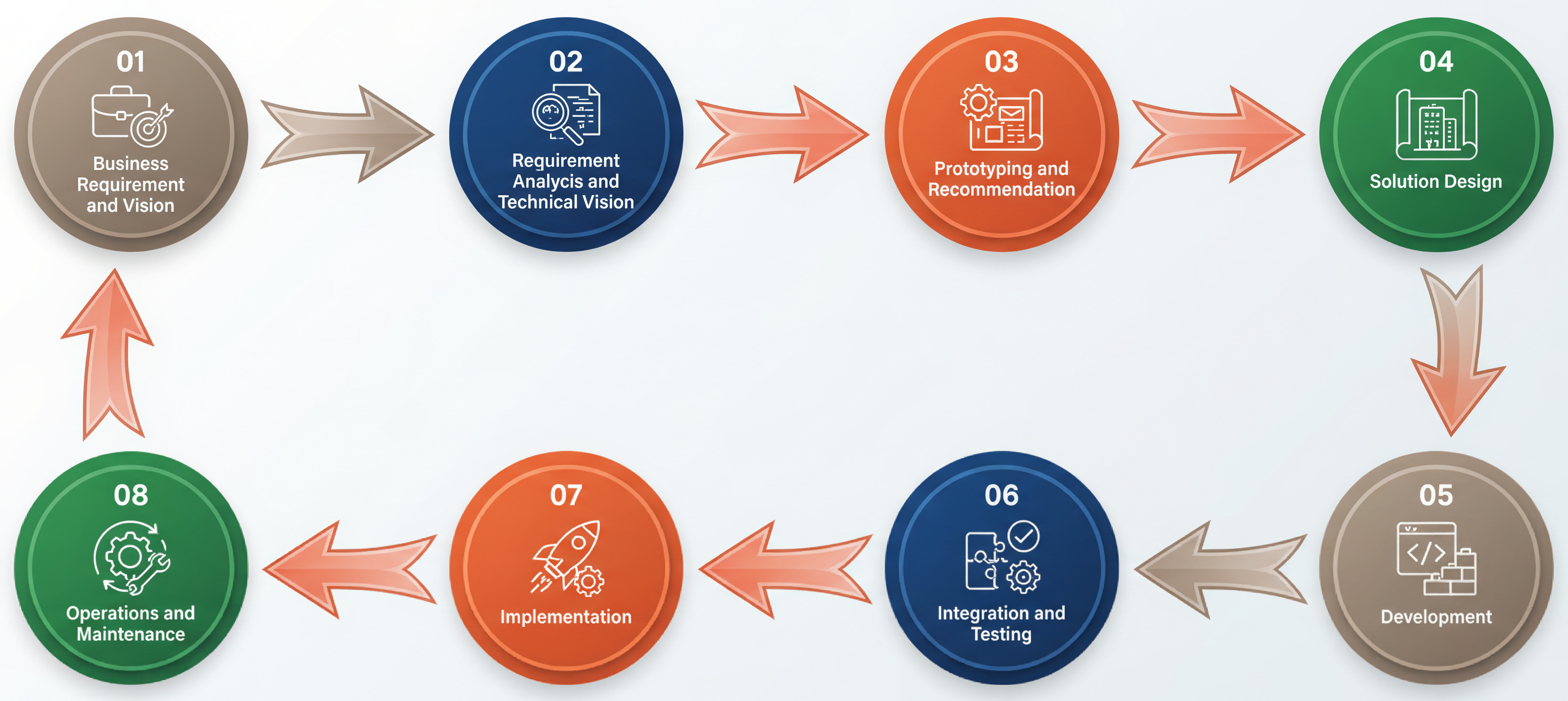
The primary responsibility is "to convert an organization's business visions into a technical solution and work as a liaison between businesses and technical stakeholders".
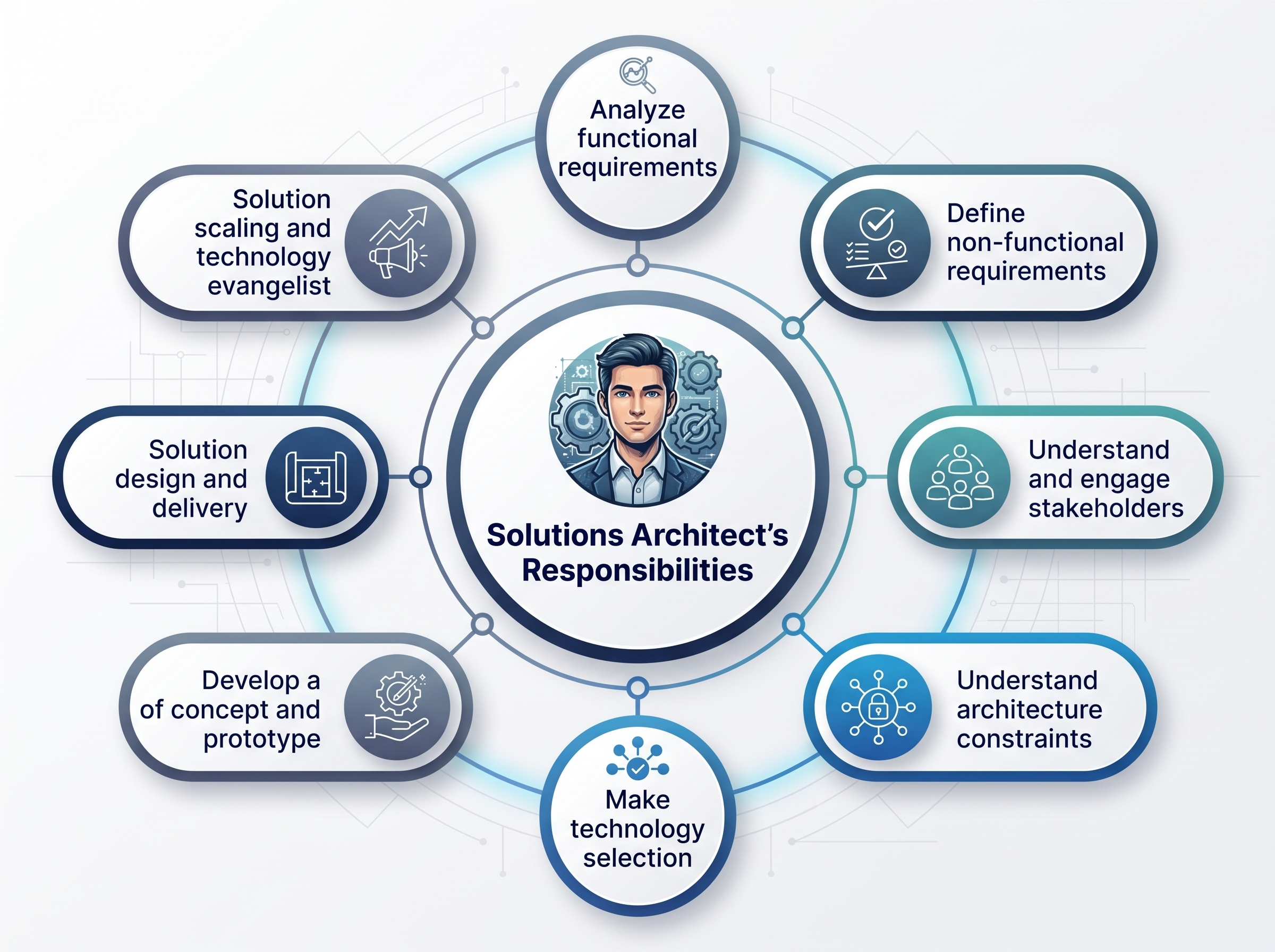
- Functional requirements describe what the system does; the architect links them to technical solutions.
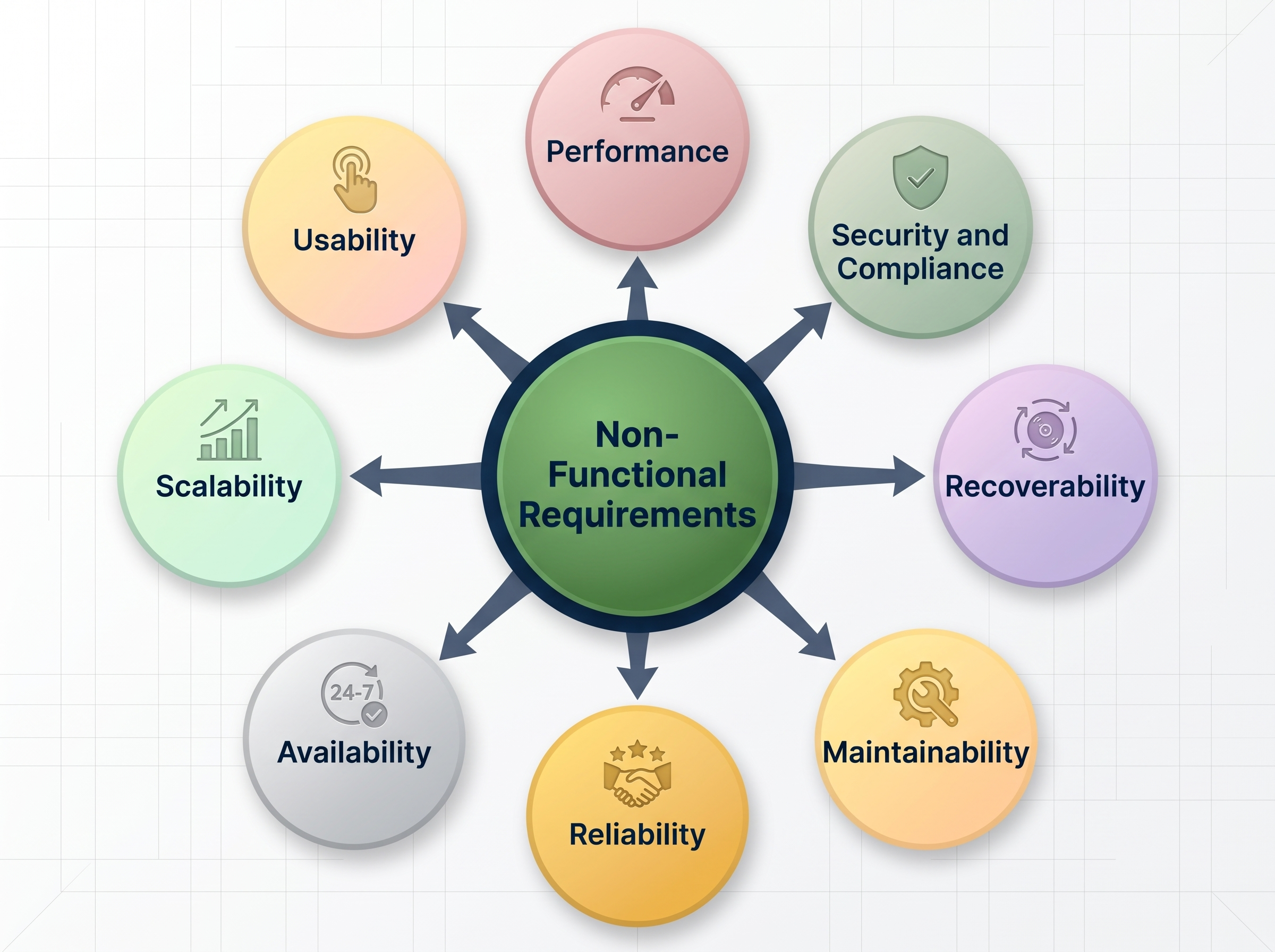
- NFRs are the part of design "that tends to slip when teams are too focused on business requirements". The architect owns them.
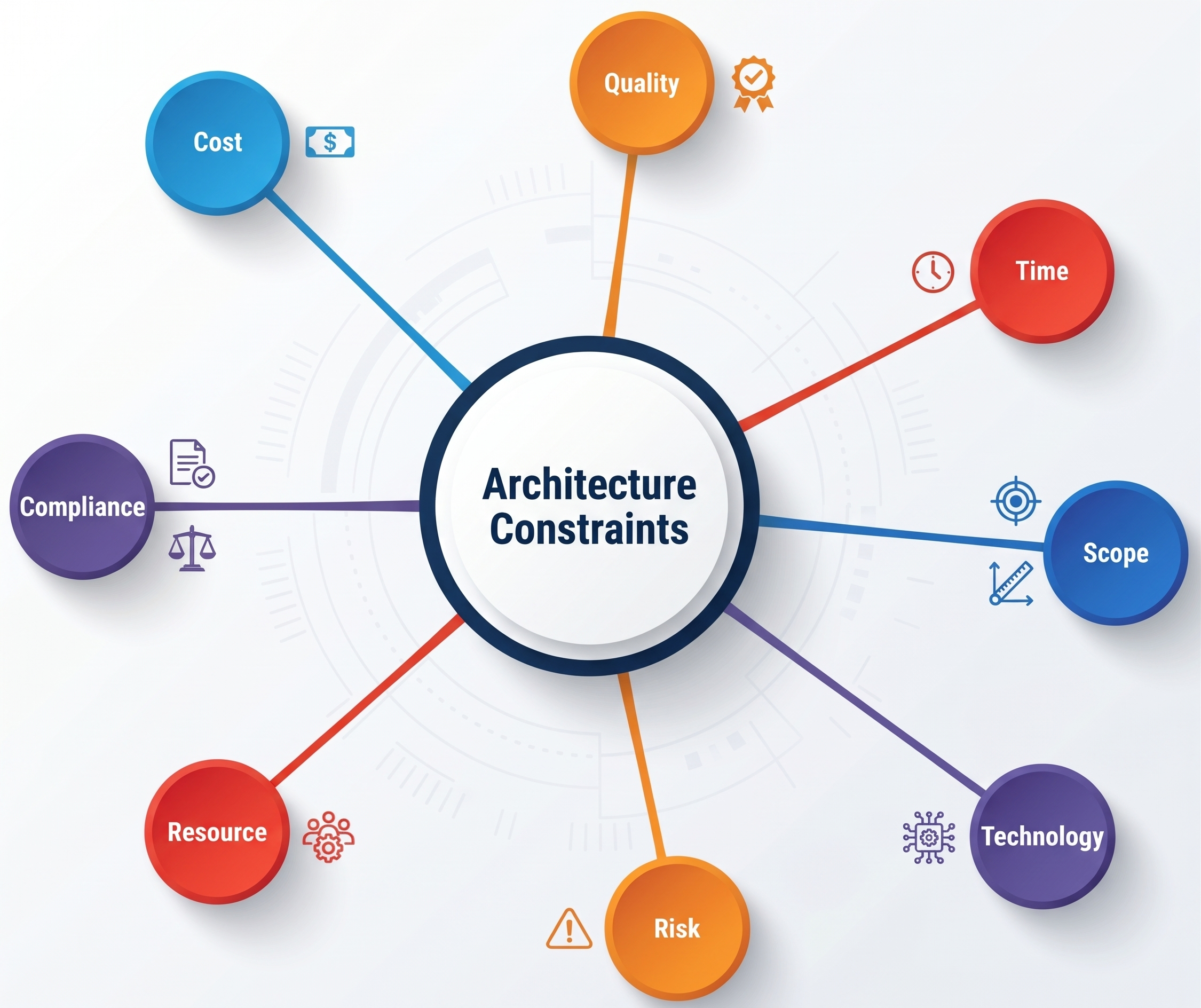
- Constraints (cost, quality, time, scope, technology, risk, resource, compliance) depend on each other; scope creep is "one of the most challenging situations".
- Technology selection uses criteria derived from the requirements and chooses technology that "satisfies current requirements but also scales for future needs".
- POC and prototype: a POC tests technology against a subset of critical requirements; a prototype may help secure funding. Neither is production ready.
- Post-launch: scaling, availability, DR, RPO/RTO, and NFRs adjusted from monitoring.
- Evangelism: blogs, workshops and forums to drive adoption.
In an Agile organisation the architect re-architects iteratively: reduce the cost of change, challenge unnecessary requirements, prototype to reduce risk and keep the architecture loosely coupled. In procurement (RFI, RFP, RFQ) the architect designs the solution, estimates resources and TCO, assesses risk and plans the migration from old systems.
Data Platform Foundations
Pipeline Flow and Time to Answer
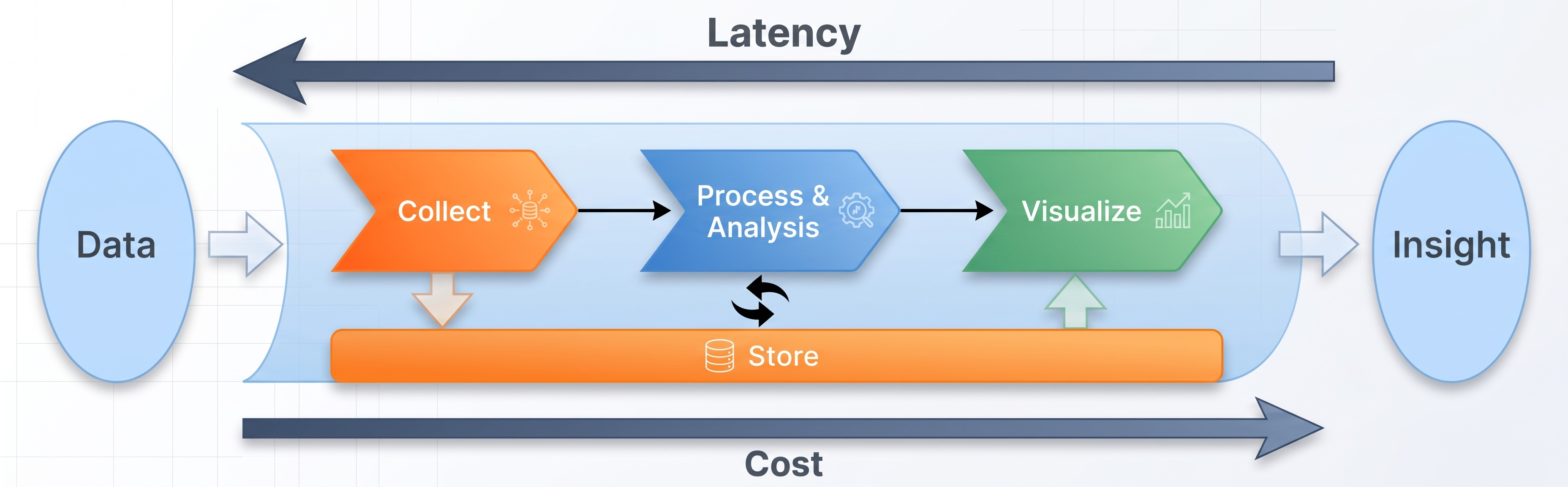
Data is collected, stored, processed and analysed (and stored again), then consumed by BI or ML. The tools you choose set the "latency between when your data was created and when you can get insight from it", and "higher performance and reduced latency usually result in a higher price". Not every answer is urgent.
FLAIR Principles
| Principle | Meaning |
|---|---|
| Findability | Data assets and their metadata (ownership, classification) are easy to find |
| Lineage | Origin, movement and history are traceable from source to consumption |
| Accessibility | Users can request and obtain access; networking supports efficient access |
| Interoperability | Formats most internal systems can use |
| Reusability | Documented schema, clearly attributed source, master data management |
Decouple the Stages
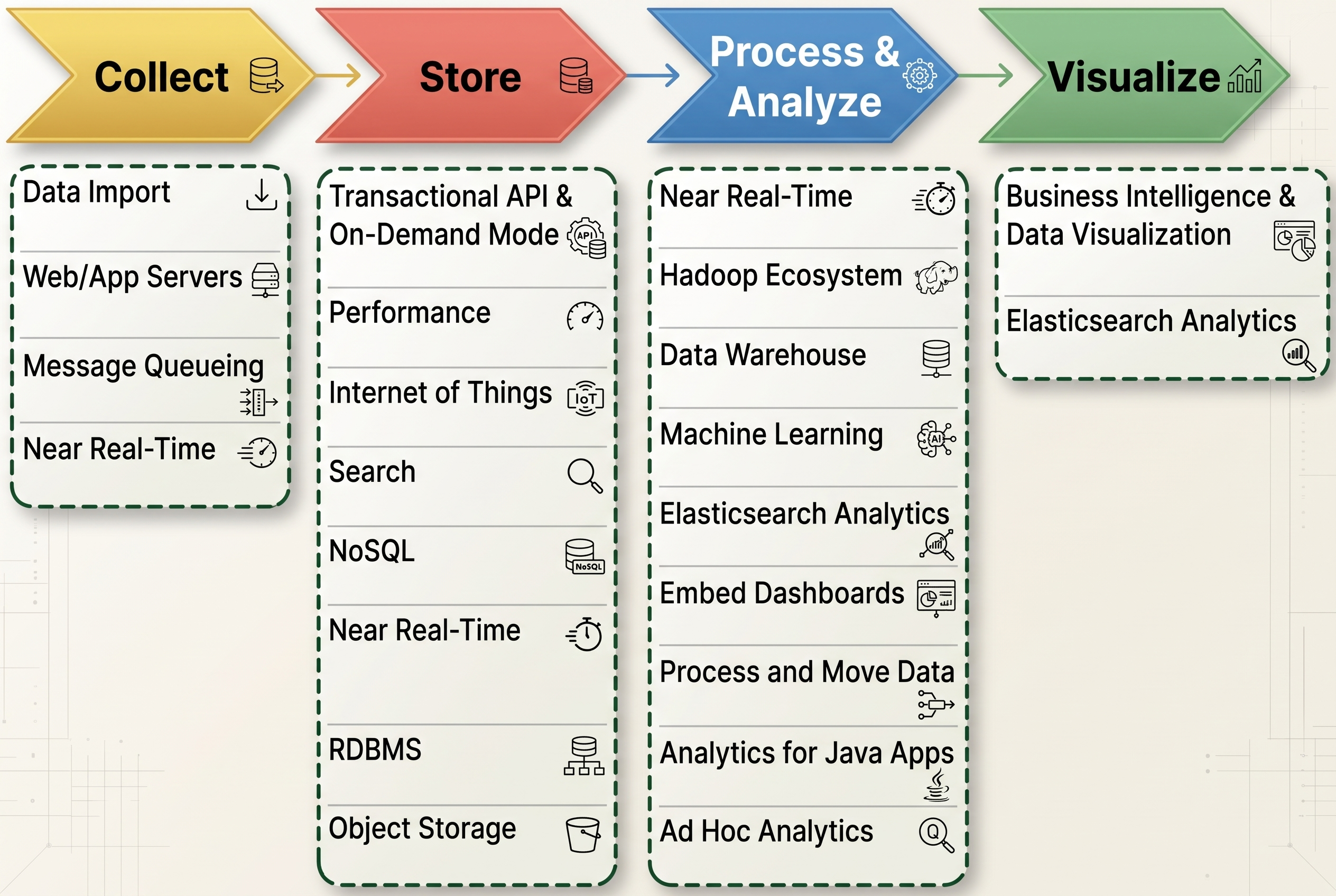
The main mistake is "handling multiple data pipeline stages with one tool". Keep ingestion, storage, processing and consumption separate, so a failed stage can resume from storage. Select tools by data structure, maximum acceptable latency, minimum acceptable throughput and end-user access patterns.
Ingestion
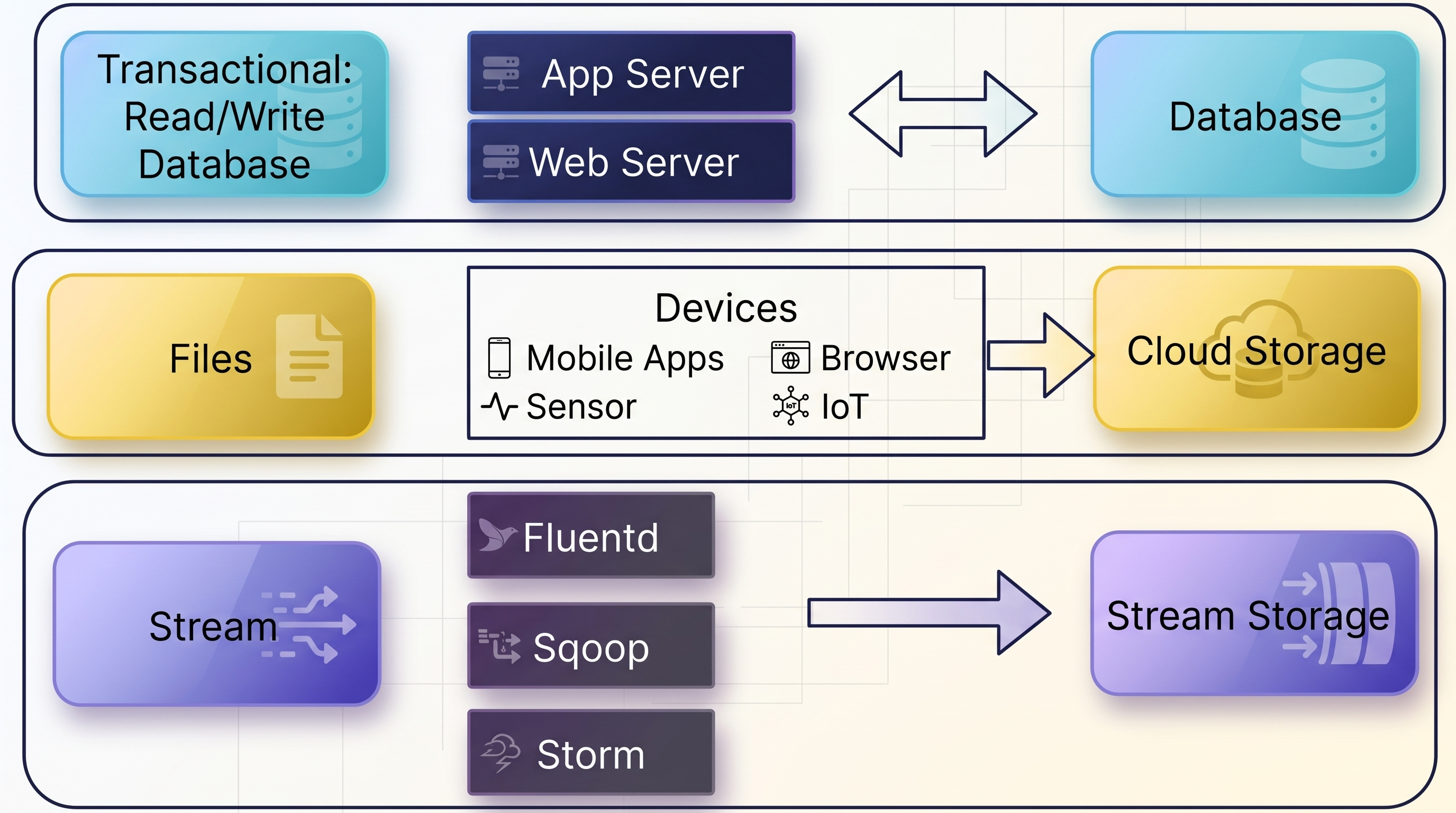
Most sources are databases, streams, logs and files. Streaming storage "decouples your collection system (producers) from the processing system (consumers)" and provides a persistent buffer.
Storage
The common mistake is using "one solution, frequently an RDBMS, to handle all of your data storage requirements". Use the right tool for the right job and answer six questions: how structured is the data, how quickly must it be queryable, how large are the records or batches, what is the volume and growth, what does storing and querying cost, and which queries will run.
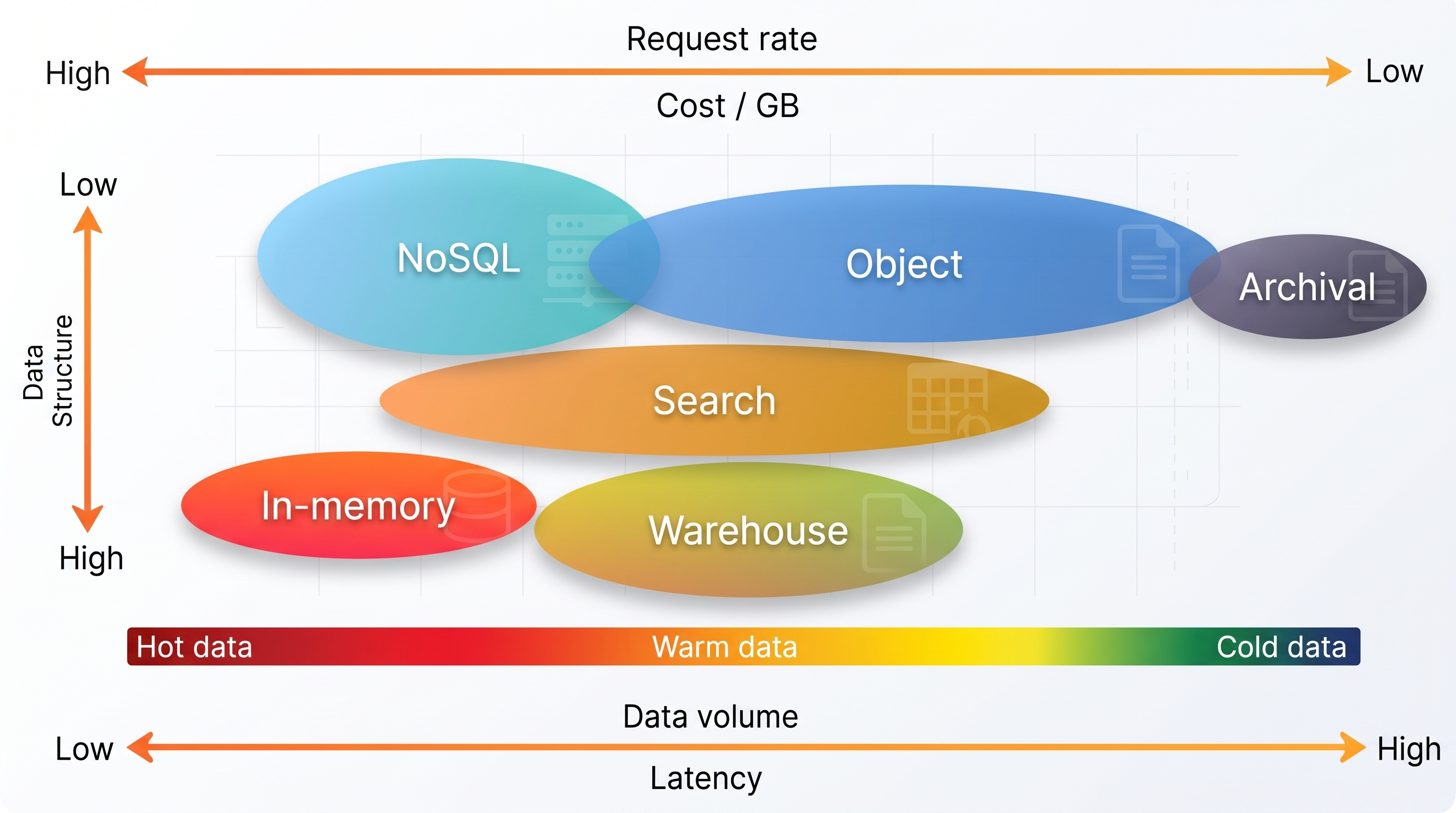
| Store | Use |
|---|---|
| In-memory / cache | Hot data |
| RDBMS (OLTP) | Transactions, ACID, complex joins |
| Data warehouse (OLAP, columnar, MPP) | Fast aggregation over structured data, loaded in batches |
| NoSQL | High-velocity small records, flexible schema |
| Search | Warm data queried ad hoc, log analysis |
| Object storage | "the go-to storage to build a scalable data lake in the cloud" |
| Vector database | Similarity search for ML and GenAI |
| Streaming store | Continuous data with replay |
Processing is either batch (large amounts of cold data, may take hours) or streaming (small amounts of hot data in near real time). The two big challenges of BI tools are "the cost of implementation and the time it takes to implement a solution".
Architecture Patterns
| Pattern | Benefits | Considerations | Fits |
|---|---|---|---|
| Data lake | Scalable, cheap central store for all data types | Becomes a "data swamp" without governance | Analytics and ML on diverse data with no upfront schema |
| Lakehouse | Lake-scale storage with warehouse schema and performance, ACID, one platform | Integration and consistency effort | BI and big data processing on one platform |
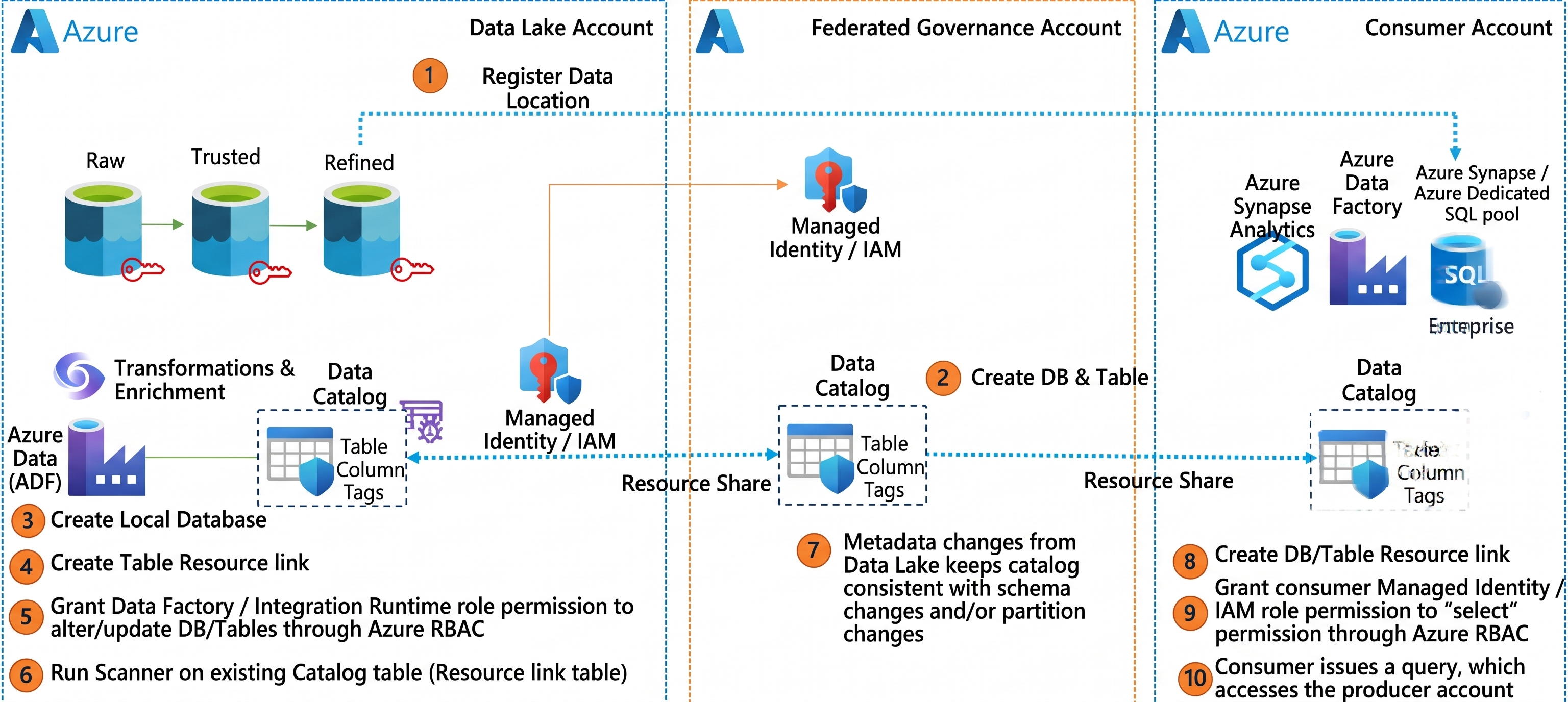
| Data mesh | Agility, domain ownership, democratisation | Needs cultural change and strong cross-domain governance | Large organisations with independent domains |
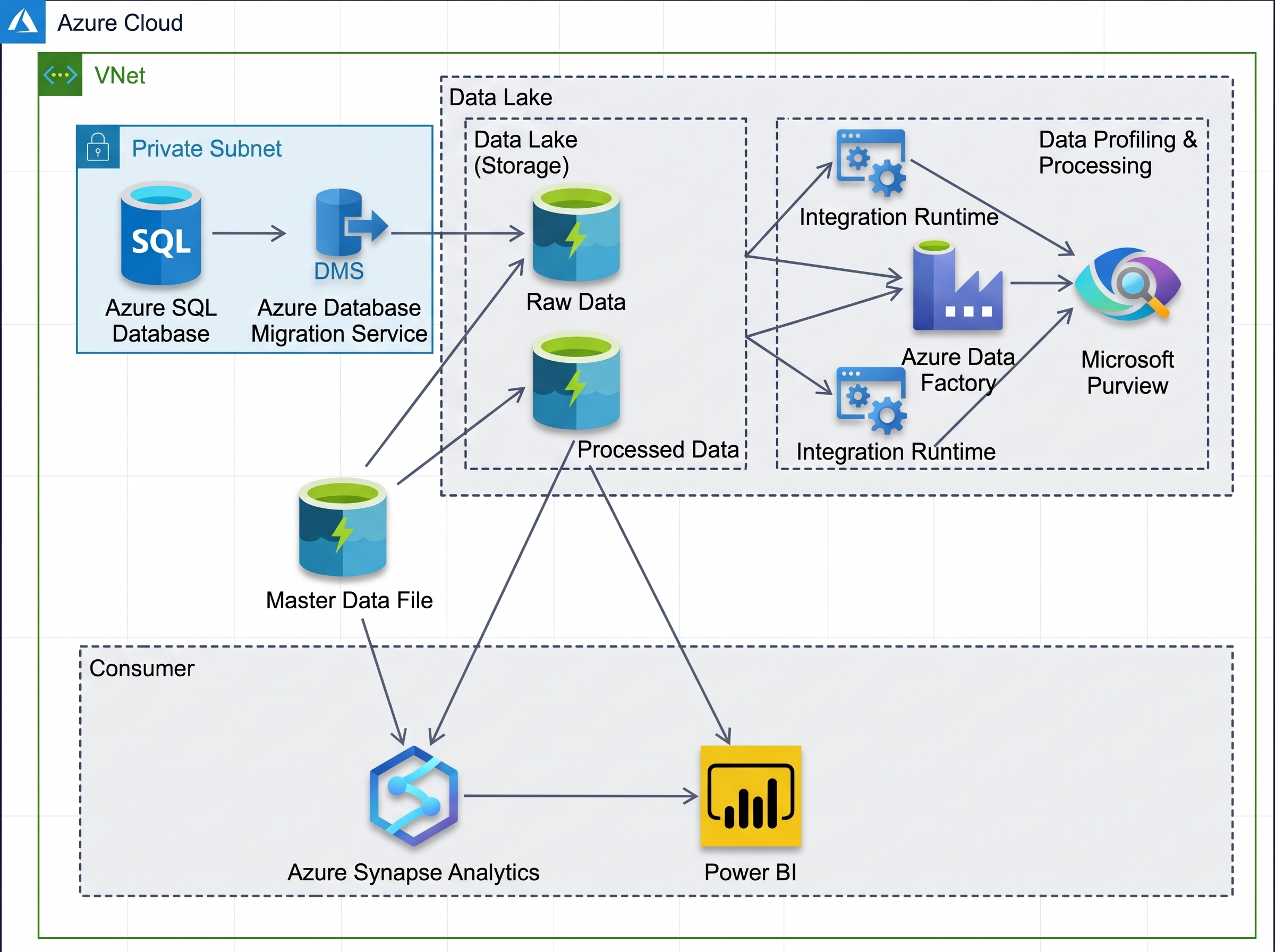
Lakes suffered from quality and security problems, and a lake plus a warehouse meant constant synchronisation and paying "double for storage". The lakehouse answers this with open formats, decoupled storage and compute, transactions and governance. Data mesh rests on four principles: domain ownership, data as a product, federated governance with central audit, and common access.
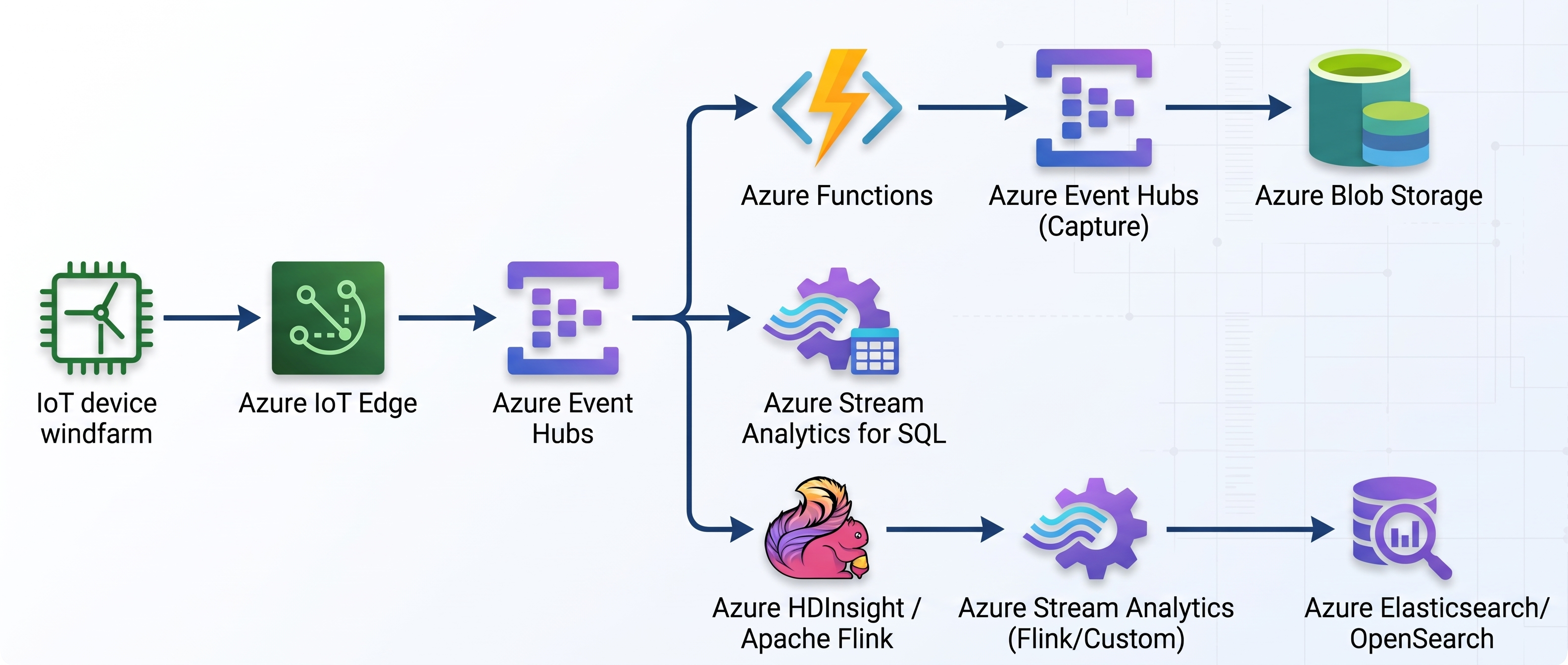
A streaming architecture adds generation, ingestion, stream storage, stream processing and output.
Choose by organisational structure, data volume and variety, analytical needs, governance and compliance, and skills. "the best choice may even be a hybrid approach".
Steps to Design and Implement a Data Platform
The 23 steps below are grouped into six phases that follow the solution delivery life cycle and the life cycle of the Solution Architecture Document (SAD).
Phase A: Initiation and Vision
- Start from the business vision. Learn "which architectural style is right for you by working backward from the business use case".
- Identify personas and use cases. Which team, what skills, what tools, employee or partner? Examples: a product manager who sees only their product, an analyst who sees PII redacted, a data scientist who needs raw data.
Phase B: Requirements and Constraints
- Access patterns: how often reports run, expected freshness and granularity, most-used data, retention and ageing out.
- Compliance and sensitivity: locality, privacy, redaction, who sees which records, deletion on request. Classify data and plan protection from the classification.
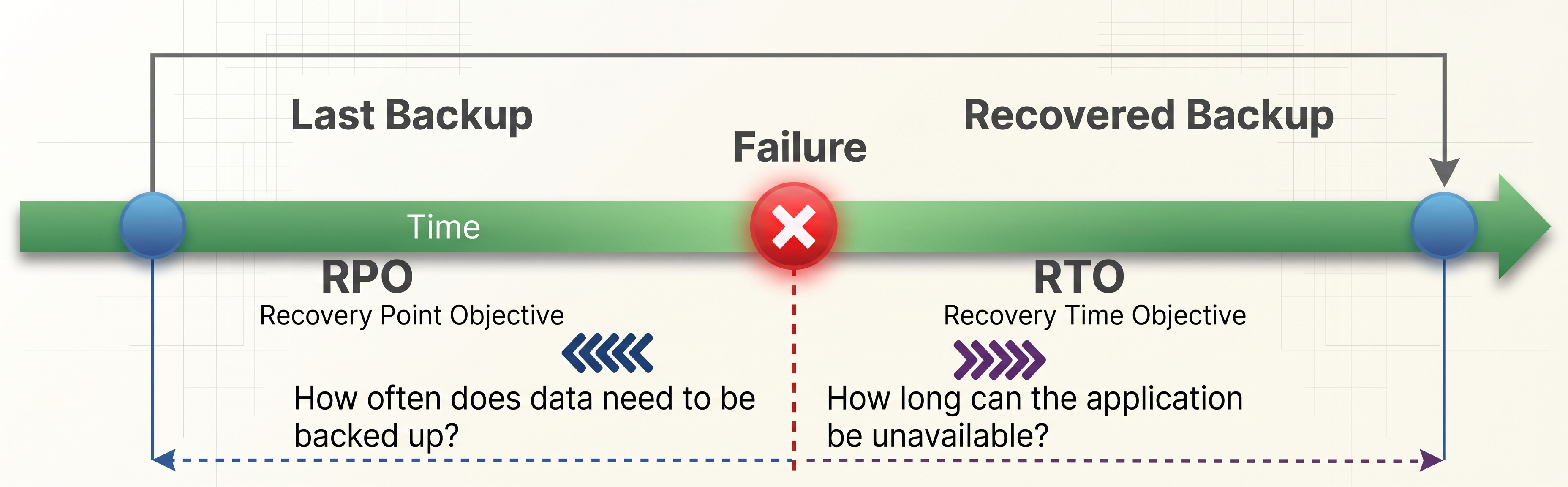
- Measurable NFRs: numbers, not adjectives — latency, throughput, availability. "The defined SLA primarily drives the RPO and RTO".
- ROI and success measures: which decisions the platform supports and how success is measured. Calculate TCO, not only upfront cost.
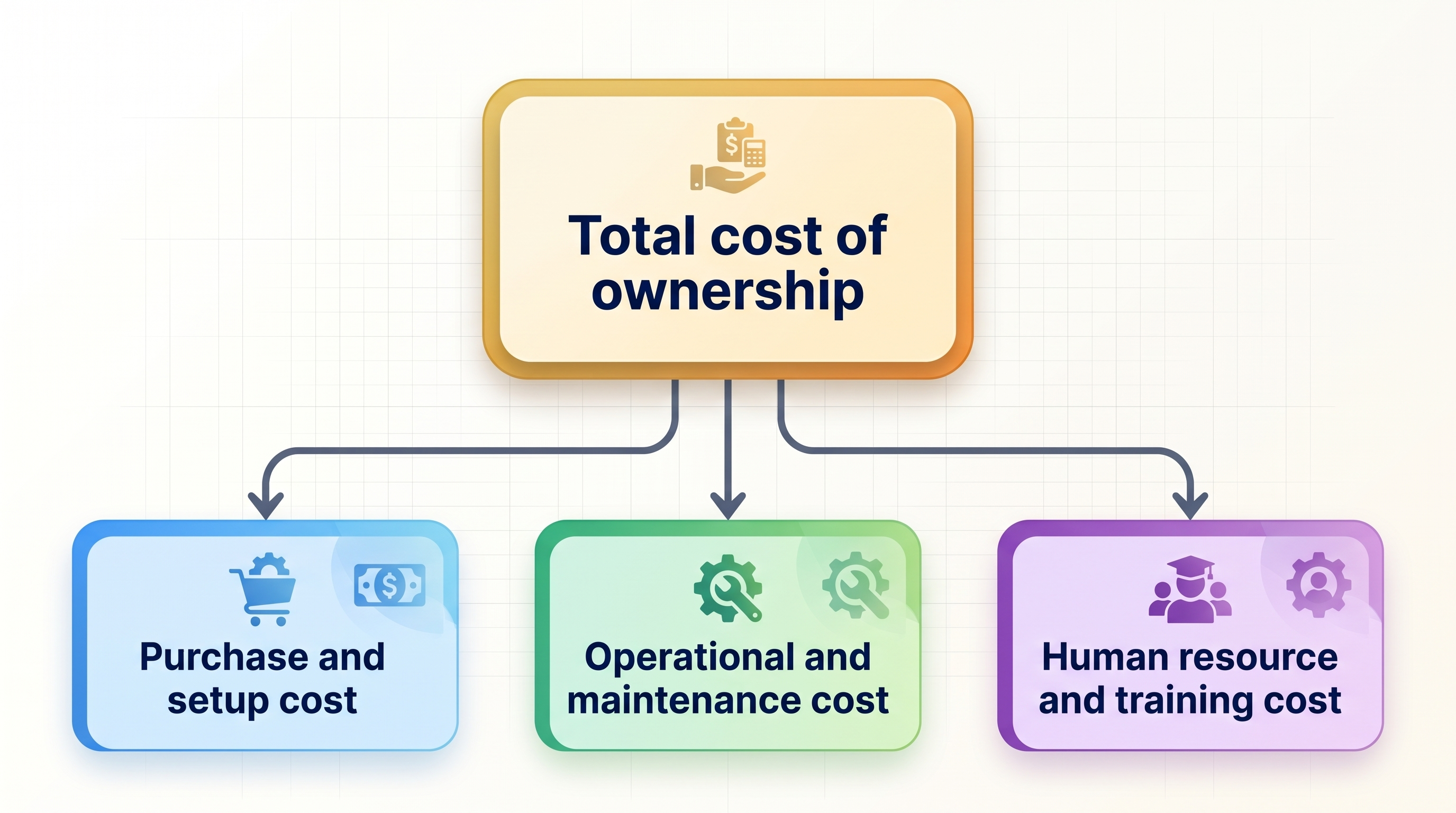
- Constraints and scope: assess trade-offs, watch for scope creep, start with an MVP and MoSCoW prioritisation.
Phase C: Architecture Design
- Profile the data and choose the pattern — lake, lakehouse, mesh, streaming or hybrid — and record each key decision with options, pros, cons and rationale.
- Design decoupled layers: raw, processed and archive storage with cataloguing between layers; every component able to scale in or out independently.
- Select technologies per layer and apply FLAIR: catalog, lineage, open formats, documented schemas, MDM.
- Security and governance: central authentication and authorisation, least privilege, role-based groups, SSO and MFA; encryption at rest and in transit; tamper-protected audit logs. "Always avoid giving direct human access to data" — keep people away from data.
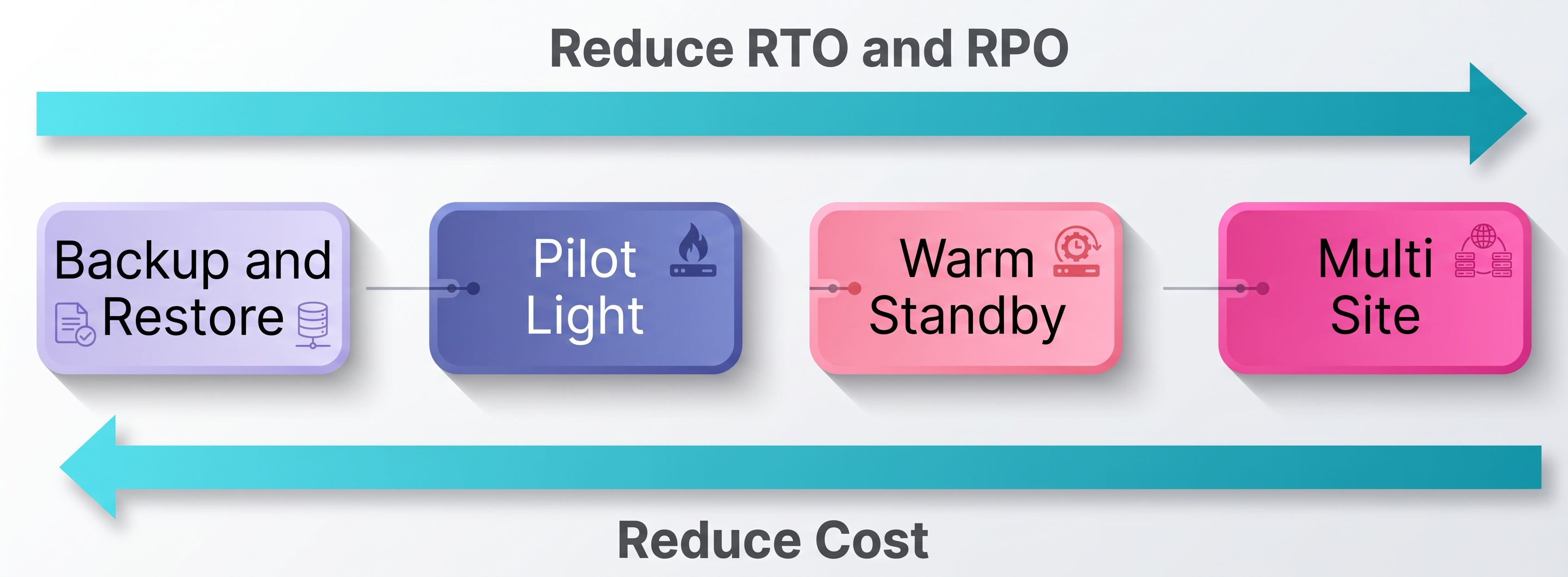
- Reliability and DR: synchronous replication for lower RPO at higher cost, asynchronous for cheaper and longer RPO; resilient pipelines with automated recovery of failed jobs.
- Performance: Parquet compression, partitioning, file size optimisation, profiling and a sanitisation layer, columnar storage and MPP.
- Cost: a consumption model, retention-based deletion and archiving, decoupled compute and storage, managed services, batch compute only while jobs run, tagging with show-back and budget alerts.
- Operations: operations as code, an orchestration layer, CI/CD, continuous monitoring, runbooks and small changes with a rollback strategy.
- ML readiness: modular, reproducible pipelines with data quality checks; MLOps is "particularly sensitive to changes in data", so monitor drift.
Phase D: Validation Before Build
- Prove key choices with a POC against a subset of critical requirements.
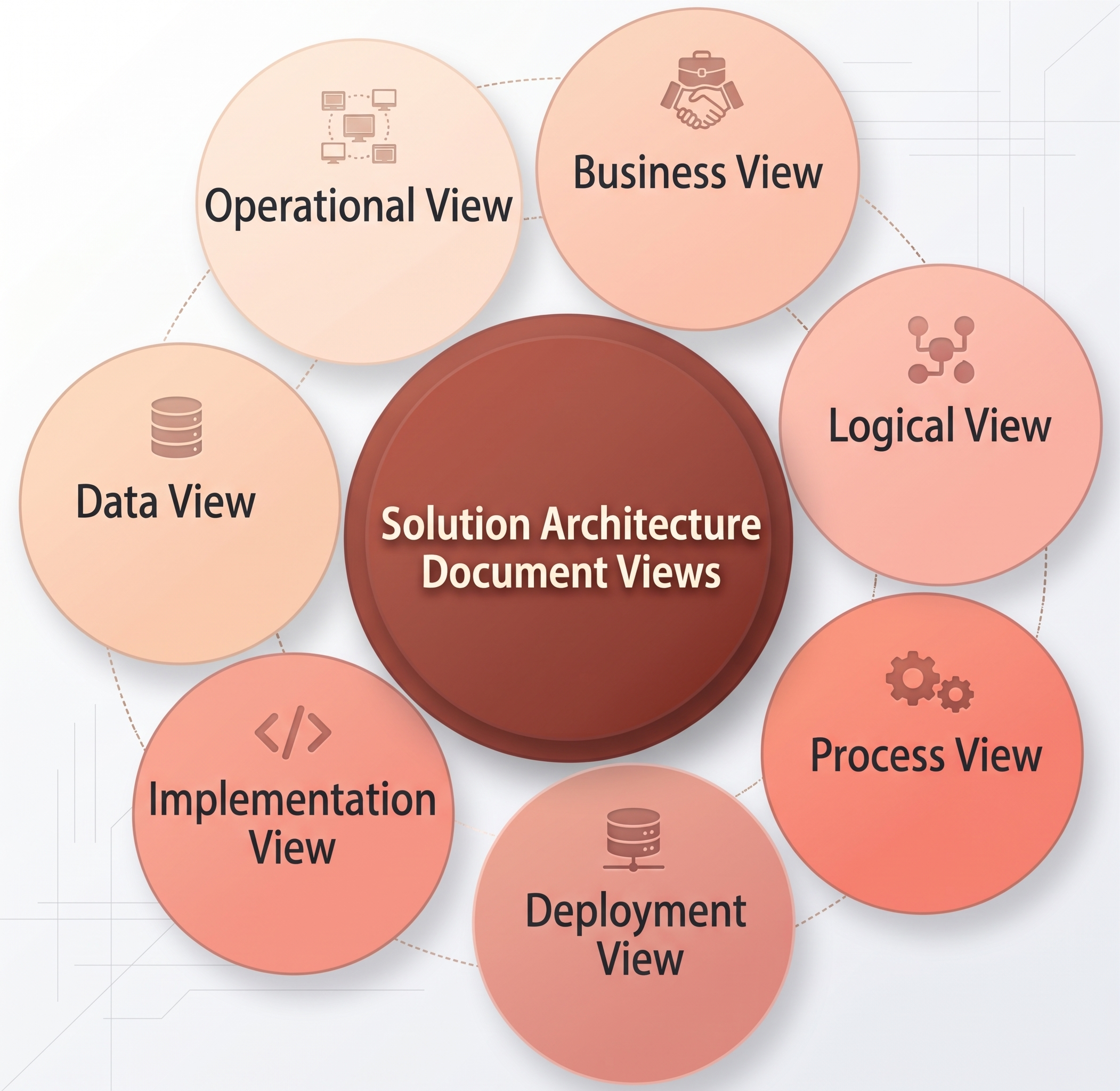
- Write and review the SAD. It must include a Data View — "how data will flow between the different components and how it will be stored" — plus data architecture, integration architecture and a data migration section.
Phase E: Implementation
- Implement incrementally with CI/CD and IaC. Moving to production is a business decision with approval.
- Migrate data with the right method: physical transfer or dedicated links for large archives, one-step migration for small databases, two-step with CDC for minimal downtime, continuous replication for mission-critical systems. Always validate data against the source before cutover and plan decommissioning.
- Validate integration, performance and recovery. "Validate your application, assuming everything fails all the time", and test DR failover regularly.
Phase F: Operate and Evolve
- Operate, monitor and optimise continuously: logging, scaling, DR, removal of idle resources, retraining for ML consumers.
- Iterate from feedback and keep the SAD current as technology, goals and regulations change.
Validation Checklist
The book illustrates big data best practices with an end-to-end reference architecture: ingestion, central storage layers, catalog and access control, batch ETL, warehouse, ad hoc query, ML, encryption, IAM, monitoring and audit.
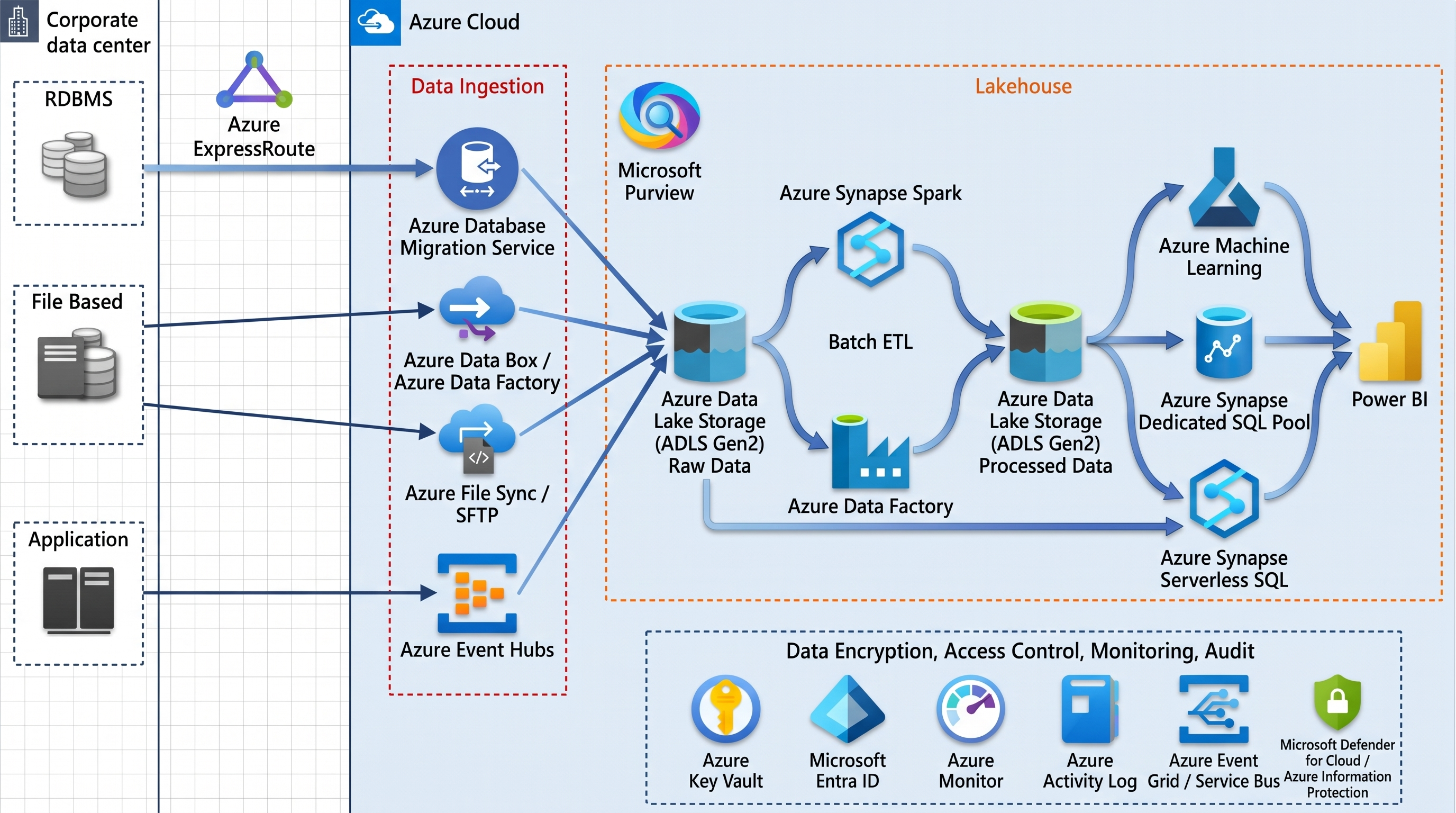
| Pillar | Check |
|---|---|
| Security | Data classified with protection policies; SSO; traceability for audit; encryption at all layers; no human write access to production data |
| Reliability | Automated profiling and cataloguing; life cycle tiering and expiry; lineage in the catalog; SLA monitoring with automated ETL recovery; tested failover |
| Performance | Profiling and validation; sanitisation layer; Parquet, partitioning, file sizes |
| Cost | Consumption model; retention rules; decoupled compute and storage; managed services; tagging and budget alerts |
| Operational excellence | Infrastructure as code; automated orchestration; monitoring with automated recovery; measured workload health |
| Documentation | SAD with Data View, data, integration and migration sections |
Pitfalls
- One tool handling several pipeline stages.
- One store, often an RDBMS, for every need.
- A data lake turning into a data swamp.
- A separate lake and warehouse with synchronisation effort and double storage cost.
- Data mesh without cultural change and strong governance.
- NFRs slipping behind business requirements; scope creep.
- Validating only the happy path; untested recovery.
- Direct human access to sensitive data.
- Sizing from peak-only metrics, leading to overprovisioning.
- A SAD that is too complex, inflexible or built without stakeholders.
Conclusion
A data platform architect turns business vision into a platform that is secure, reliable, fast, affordable and operable. The path is simple to state: work backward from personas and use cases, make requirements measurable, decouple the pipeline, choose the pattern that fits the organisation, design every pillar up front, prove choices with a POC, document them in a SAD, and keep iterating. The book's examples are mostly AWS-based, but the principles apply to any platform, Databricks and Azure included.
Data Governance on Databricks: A Unity Catalog Runbook
A step-by-step model for governing a Databricks lakehouse with Unity Catalog: schemas as the governance unit, governed tags, three-tier roles from Entra ID, tag-driven row filters and column masks, service principals, and governance as code.
dbt on Databricks: Data Transformation Pipelines
How to connect dbt Cloud to Databricks Unity Catalog — step by step: SQL Warehouse, Unity Catalog, access tokens, project initialisation, and repository setup.