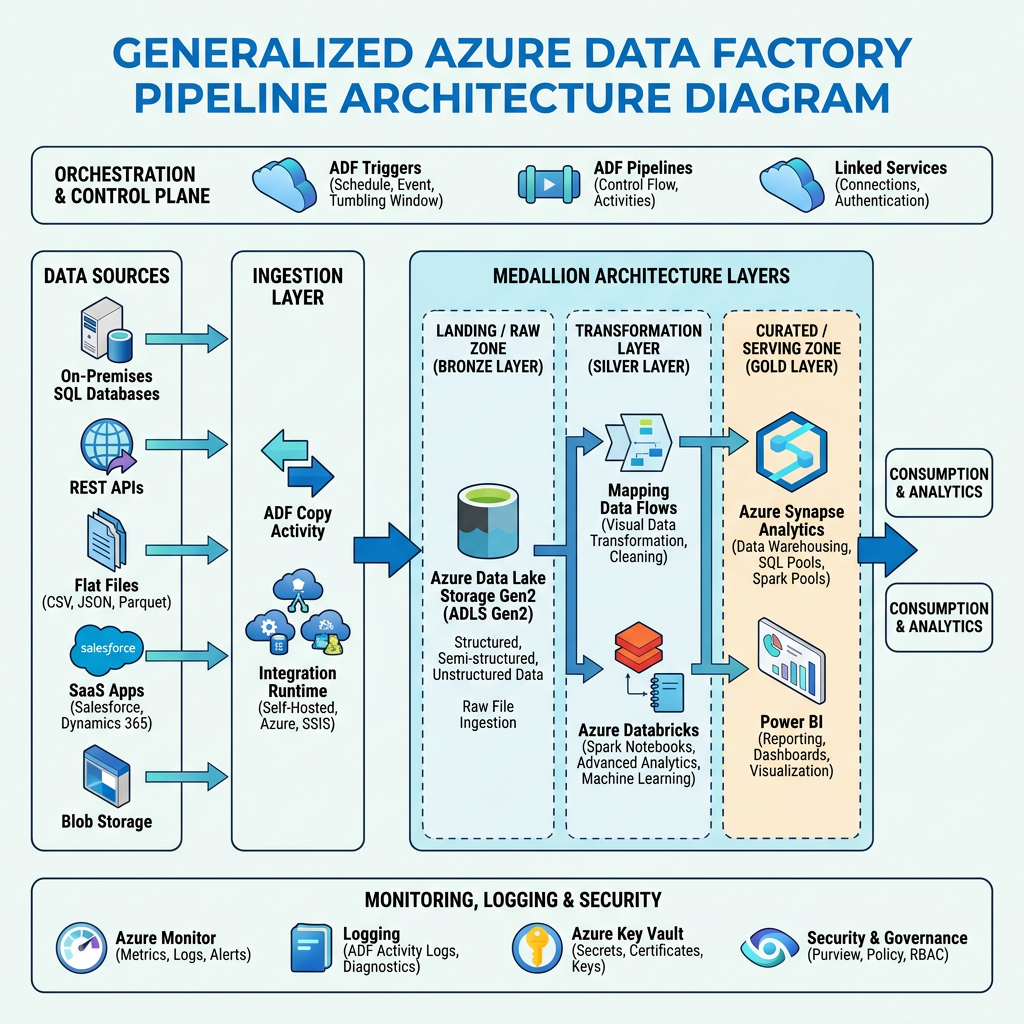
Generalised ADF Pipeline Architecture
Architected a metadata-driven data workflow on Azure Data Factory that eliminated per-source pipeline development. A hierarchy of single-purpose pipelines — orchestrated by system- and object-level top-level pipelines — supports ingestion, delta processing (Snowflake & Databricks), data quality testing, auditing, and error handling. Adding a new data source requires only a metadata record, no pipeline changes.
Architected and delivered a generalised, metadata-driven data workflow built on Azure Data Factory (ADF), designed to support data ingestion, transformation, quality testing, auditing, and error handling across multiple source systems and target warehouses. The framework is composed of a set of independent, single-purpose pipelines that are orchestrated by two top-level processing pipelines — one at system level and one at object level — driven entirely by configuration held in the Metadata database.
The architecture eliminates the need to build or modify pipelines when new data sources, objects, or processing parameters are introduced. Reusable Copy pipelines handle ingestion, data quality, and schema evolution scenarios, while custom pipelines are available as drop-in replacements for non-standard cases. The result is a scalable, maintainable platform that supports multiple source systems and both Snowflake and Databricks target warehouses from a single shared codebase.
Overall Architecture
The workflow is structured as a hierarchy of independent, composable ADF pipelines. Two orchestration pipelines sit at the top of the hierarchy — one for system-level processing and one for object-level processing. Beneath them, a set of specialised pipelines each handle a single concern: ingestion, raw processing, quality testing, auditing, or error handling. This layered design means each pipeline can be developed, tested, versioned, and maintained independently.
Technologies & Stack
- Azure Data Factory (ADF) — orchestration engine; all pipelines deployed and managed in ADF
- Metadata Database — single source of truth for system config, object definitions, pipeline version assignments, and audit records
- Snowflake — one of two target warehouse platforms with a dedicated raw processing pipeline
- Databricks / Delta Lake — second target warehouse platform; raw Parquet processed via the Databricks pipeline
- Azure Data Lake Storage — staging area for raw Parquet files between ingestion and processing
- Metadata UI — user interface for registering systems, objects, test templates, and pipeline version assignments
Orchestration Layer
SystemProcessing Pipeline
The SystemProcessing pipeline is the outermost entry point for the workflow. It queries the Metadata database for all active systems, then iterates over them and invokes the ObjectProcessing pipeline for each. System-level configuration — such as source connection parameters, schedule settings, and global flags — is resolved here and passed downstream as pipeline parameters, keeping individual pipelines stateless with respect to system context.
ObjectProcessing Pipeline
The ObjectProcessing pipeline is the core orchestrator for a single system's data objects. For each active object it:
- Loads object metadata — schema, processing mode, pipeline version, test templates — from the Metadata DB
- Resolves which ingestion pipeline to invoke — general or custom — based on the object's metadata registration
- Calls the appropriate Copy pipeline to ingest source data into the staging data lake
- Triggers the correct delta processing pipeline (Snowflake or Databricks) based on the object's target warehouse
- Invokes data quality testing if test templates are configured for the object
- Calls the AuditLogging pipeline on success, or the ErrorHandling pipeline on failure
Because all pipeline selection logic is driven by metadata object properties, adding a new object to the workflow requires only a metadata record — no pipeline modifications.
Ingestion Layer — General & Custom Copy Pipelines
Data ingestion is handled by Copy Activity pipelines that read from source systems and write raw Parquet files to the data lake staging area. Two variants exist — a general pipeline covering the majority of objects, and custom pipelines for edge cases — both adhering to the same output contract so downstream processing pipelines are unaffected by the choice of ingestion variant.
Delta Processing Layer — Snowflake & Databricks
Two independent Delta processing pipelines consume the staged Parquet files and load data into the respective target warehouse. Both pipelines are invoked with the same interface (object metadata + staging path) and support the same set of processing modes — full load, incremental load, and CDC merge — ensuring consistent behaviour regardless of the target platform.
- DeltaProcessingSnowflake — reads staged Parquet via ADF and executes the appropriate load strategy against Snowflake tables using SQL COPY INTO, INSERT, or MERGE commands
- DeltaProcessingDatabricks — delegates to the Delta Processing Framework via a Databricks notebook activity; handles full load, incremental, and CDC processing into Delta Lake tables
Separating the two processing pipelines ensures that Snowflake-specific and Databricks-specific implementation details are fully isolated. Changes to one warehouse's loading behaviour have zero impact on the other.
Copy Pipeline Reuse Across Concerns
A deliberate architectural choice was to reuse the Copy Activity pipeline pattern across three distinct workflow concerns rather than building bespoke pipelines for each:
- Data Ingestion — CopyIngestion loads source data into the staging data lake
- Data Quality — CopyQuality loads a source snapshot for quality test comparison
- Schema Evolution — CopySchemaEvolution loads a source sample to detect schema drift against the registered object definition
This reuse means the same tested, monitored pipeline infrastructure serves multiple purposes. Operational knowledge, alerting rules, and performance baselines apply uniformly, reducing the overall surface area of the platform.
Metadata-Driven Pipeline Selection
All pipeline behaviour is governed by object and system records in the Metadata database. Pipeline parameters are passed as ADF pipeline objects — structured metadata payloads — rather than individual scalar parameters. This design means:
- New processing parameters can be added to the metadata schema and consumed by pipelines without modifying pipeline definitions or adding new parameters to the ADF pipeline interface
- Pipeline selection (general vs. custom ingestion, Snowflake vs. Databricks processing) is resolved at runtime by reading the object's metadata record
- Version assignments are stored per object in the Metadata DB, allowing each object to be mapped to a specific pipeline version independently
- Zero-touch onboarding — adding a new data source or object to the platform requires only a metadata registration, not a pipeline deployment
Single-Purpose Pipeline Design
Each pipeline in the framework is designed to do exactly one thing. Ingestion pipelines ingest. Processing pipelines process. Audit pipelines audit. This strict single-responsibility approach delivers practical advantages across the entire development lifecycle:
- Testability — each pipeline can be unit-tested and integration-tested in isolation, with well-defined inputs and outputs and no implicit dependencies on sibling pipelines
- Maintainability — a bug or change in the error handling pipeline has no risk of affecting the ingestion or processing pipelines
- Reusability — the same Copy pipeline is invoked for ingestion, quality, and schema evolution without code duplication
- Clarity — developers and operators can identify the purpose of any pipeline immediately from its name and scope
- Independent deployment — a new version of one pipeline can be deployed and tested without touching the rest of the framework
Auditing & Error Handling
Dedicated pipelines handle auditing and error management as first-class concerns rather than afterthoughts embedded in processing logic.
AuditLogging Pipeline
Called by ObjectProcessing on every successful pipeline run, the AuditLogging pipeline writes a structured audit record to the Metadata database containing the object run ID, pipeline name and version, execution timestamps, row counts, processing mode, and source/target details. This creates a complete, queryable history of every data movement event across the platform.
ErrorHandling Pipeline
On any pipeline failure, the ObjectProcessing pipeline's error branch invokes the ErrorHandling pipeline. It captures structured error details — pipeline name, activity, error code, message, and object run ID — and writes them to the Metadata database. Configurable per-object actions include alert notification, retry scheduling, and run status flagging. Because error handling is a separate pipeline, its logic can be updated independently and applied consistently across all failure scenarios in the framework.
Pipeline Versioning & Backward Compatibility
Larger changes to pipeline logic are managed through explicit versioning rather than in-place modification, ensuring that existing objects are never unexpectedly affected by updates. The versioning strategy is designed for gradual, controlled migration.
Design Principles & Benefits
- Metadata-driven: all pipeline behaviour, selection, and versioning is governed by the Metadata DB — no pipeline changes are required to onboard new objects or parameters
- Single-purpose pipelines: each pipeline has one clear responsibility, making the entire framework easier to test, maintain, and extend
- Infrastructure reuse: Copy pipelines serve ingestion, data quality, and schema evolution from the same codebase
- Multi-platform support: Snowflake and Databricks are supported through dedicated but interface-compatible processing pipelines
- Full auditability: every successful run and every failure is recorded in the Metadata DB with a unique object run ID
- Controlled evolution: versioned pipelines with backward compatibility allow the framework to evolve without disrupting live objects
- Extensibility: custom ingestion pipelines and custom test SQL provide escape hatches for non-standard cases without coupling them to the core framework
Outcome & Impact
The generalised ADF workflow became the standard data movement platform across all registered source systems and both warehouse targets. Onboarding a new data source was reduced from a pipeline development effort to a metadata configuration task. The single-purpose pipeline design significantly reduced the time required to diagnose and fix issues in production, and the versioning strategy allowed the framework to evolve iteratively without service disruption. The Copy pipeline reuse pattern, shared with the Automated Testing Framework and Delta Lake Table Processing Framework, further reduced the total number of pipelines under management while increasing coverage.